> ## Documentation Index
> Fetch the complete documentation index at: https://docs.openpage.fun/llms.txt
> Use this file to discover all available pages before exploring further.
# Community Management
> Learn how to effectively manage your OpenPage community, including community settings, and guidelines for badges and raffles.
## Overview
Community management on OpenPage is designed to give you complete control over your community's growth, engagement, and member experience. Whether you're running a gaming community, creator collective, or brand community, OpenPage provides the tools you need to manage members, and create engaging experiences.
## Getting Started with Community Management
### Accessing Community Settings
1. Navigate to your community dashboard
2. Click on the **Settings** tab (gear icon) in the top navigation
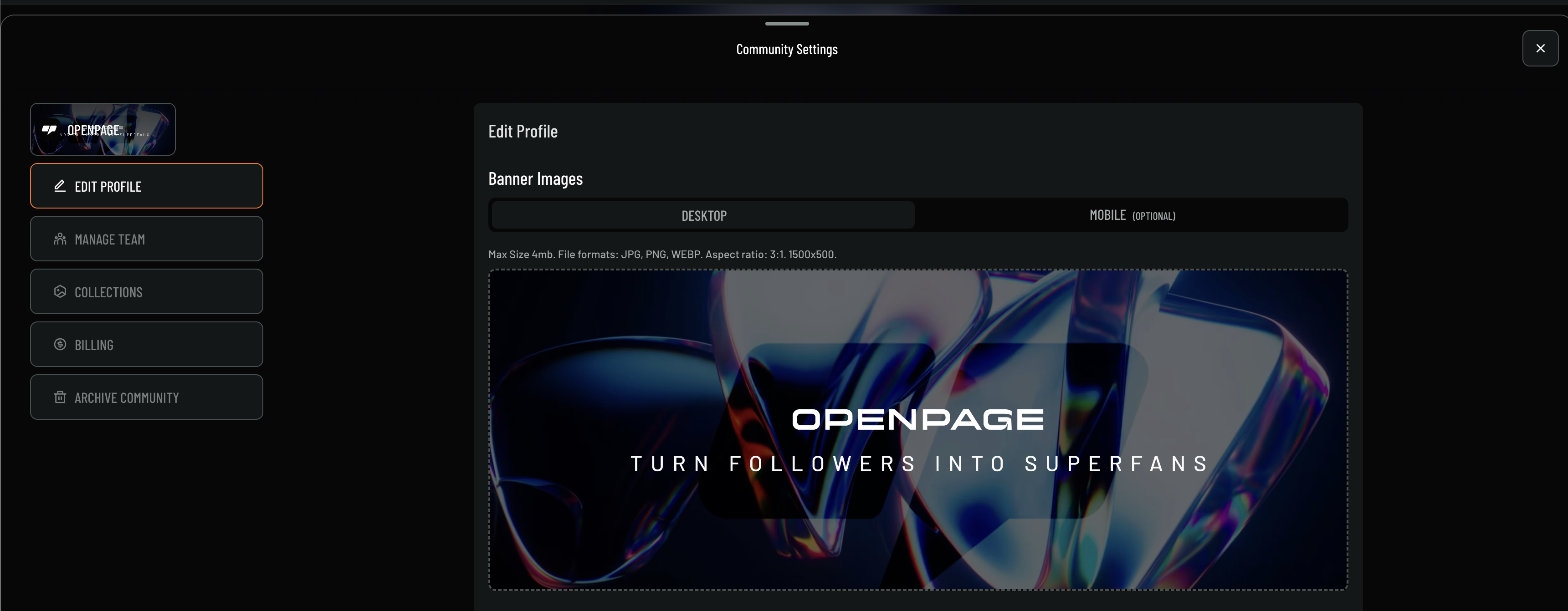
The Community Settings interface provides a comprehensive dashboard for managing your community, with options to edit your profile, manage team members, handle collections, manage billing, and archive the community when needed.
### Profile Management
The Edit Profile section allows you to customize your community's visual identity:
**Banner Images**
* **Desktop Banner**: Upload a banner image for desktop viewing (1500x500px, 3:1 aspect ratio)
* **Mobile Banner**: Optional mobile-optimized banner
* **File Requirements**: Max 4MB, formats: JPG, PNG, WEBP
 ### Basic Information
* **Community Name**: Your community's display name
* **Description**: Brief description of your community
* **Category**: Choose from gaming, art, music, podcast, etc.
### Analytics & Insights (Pro Feature)
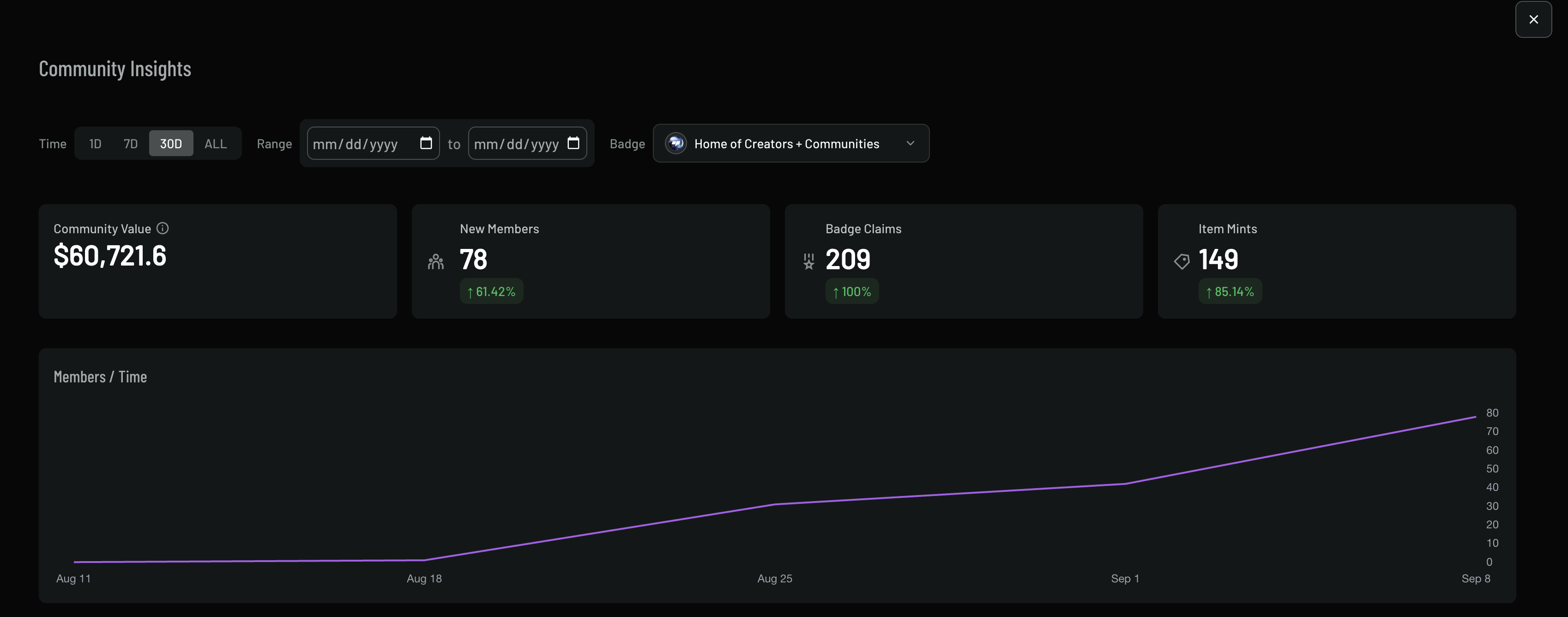
Track your community's health and growth with the Community Insights dashboard:
### Basic Information
* **Community Name**: Your community's display name
* **Description**: Brief description of your community
* **Category**: Choose from gaming, art, music, podcast, etc.
### Analytics & Insights (Pro Feature)
Track your community's health and growth with the Community Insights dashboard:
 #### Key Metrics
The dashboard displays four key performance indicators:
1. **Community Value**: Total value of your community (e.g., \$60,721.6)
2. **New Members**: Number of new members with growth percentage (e.g., 78 members, +61.42%)
3. **Badge Claims**: Total badge claims with growth rate (e.g., 209 claims, +100%)
4. **Item Mints**: Number of items minted with growth percentage (e.g., 149 mints, +85.14%)
#### Time Range Analysis
* **Time Range Selection**: Choose from 1D, 7D, 30D, or ALL time periods
* **Custom Date Range**: Select specific date ranges for detailed analysis
* **Community Filter**: Filter insights by specific badges or communities
#### Member Growth Tracking
The "Members / Time" graph shows:
* **Growth Trend**: Visual representation of member growth over time
* **Timeline**: X-axis shows dates (e.g., Aug 11, Aug 18, Aug 25, Sep 1, Sep 8)
* **Member Count**: Y-axis shows member count from 0 to 80
* **Growth Pattern**: Consistent growth with steeper increases toward the end of the period
#### Additional Analytics
* **Member Growth**: Track new member acquisition
* **Engagement Metrics**: Monitor post interactions and activity
* **Moderation Stats**: Track moderation actions and reports
* **Badge Distribution**: Monitor badge awards and achievements
## Best Practices
### Community Growth
* **Clear Value Proposition**: Make it clear what members get from joining
* **Regular Engagement**: Post regularly and encourage member participation
* **Member Recognition**: Acknowledge active and contributing members
* **Feedback Loop**: Listen to member feedback and suggestions
### Moderation
* **Consistent Enforcement**: Apply rules fairly and consistently
* **Transparent Communication**: Explain moderation actions when necessary
* **Community Guidelines**: Keep rules clear and accessible
* **Member Education**: Help members understand community expectations
### Member Experience
* **Welcome New Members**: Have a clear onboarding process
* **Member Support**: Provide help and support channels
* **Recognition Programs**: Use badges and rewards to recognize contributions
* **Community Events**: Organize regular events and activities
## Advanced Features
### Integration with Other Tools
* **Discord Integration**: Connect with Discord servers
* **Social Media**: Link to Twitter, Instagram, and other platforms
* **Website Integration**: Embed community features on your website
* **API Access**: Use OpenPage APIs for custom integrations
## Support
Need help with community management? Check out our [support resources](/support) or contact our team for assistance with advanced community management features.
#### Key Metrics
The dashboard displays four key performance indicators:
1. **Community Value**: Total value of your community (e.g., \$60,721.6)
2. **New Members**: Number of new members with growth percentage (e.g., 78 members, +61.42%)
3. **Badge Claims**: Total badge claims with growth rate (e.g., 209 claims, +100%)
4. **Item Mints**: Number of items minted with growth percentage (e.g., 149 mints, +85.14%)
#### Time Range Analysis
* **Time Range Selection**: Choose from 1D, 7D, 30D, or ALL time periods
* **Custom Date Range**: Select specific date ranges for detailed analysis
* **Community Filter**: Filter insights by specific badges or communities
#### Member Growth Tracking
The "Members / Time" graph shows:
* **Growth Trend**: Visual representation of member growth over time
* **Timeline**: X-axis shows dates (e.g., Aug 11, Aug 18, Aug 25, Sep 1, Sep 8)
* **Member Count**: Y-axis shows member count from 0 to 80
* **Growth Pattern**: Consistent growth with steeper increases toward the end of the period
#### Additional Analytics
* **Member Growth**: Track new member acquisition
* **Engagement Metrics**: Monitor post interactions and activity
* **Moderation Stats**: Track moderation actions and reports
* **Badge Distribution**: Monitor badge awards and achievements
## Best Practices
### Community Growth
* **Clear Value Proposition**: Make it clear what members get from joining
* **Regular Engagement**: Post regularly and encourage member participation
* **Member Recognition**: Acknowledge active and contributing members
* **Feedback Loop**: Listen to member feedback and suggestions
### Moderation
* **Consistent Enforcement**: Apply rules fairly and consistently
* **Transparent Communication**: Explain moderation actions when necessary
* **Community Guidelines**: Keep rules clear and accessible
* **Member Education**: Help members understand community expectations
### Member Experience
* **Welcome New Members**: Have a clear onboarding process
* **Member Support**: Provide help and support channels
* **Recognition Programs**: Use badges and rewards to recognize contributions
* **Community Events**: Organize regular events and activities
## Advanced Features
### Integration with Other Tools
* **Discord Integration**: Connect with Discord servers
* **Social Media**: Link to Twitter, Instagram, and other platforms
* **Website Integration**: Embed community features on your website
* **API Access**: Use OpenPage APIs for custom integrations
## Support
Need help with community management? Check out our [support resources](/support) or contact our team for assistance with advanced community management features.